-
Qt6(c++)에서 OpenSSL AES256 사용하기Qt (GUI) 2024. 10. 1. 16:56
1.OpenSSL 설치
윈도우
설치시 DLL은 OpenSSl폴더로 선택
C:\Program Files\OpenSSL-Win64의 bin
https://slproweb.com/products/Win32OpenSSL.html
Win32/Win64 OpenSSL Installer for Windows - Shining Light Productions
Minimum system requirements: Windows XP or later 32MB RAM 200MHz CPU 30MB hard drive space Recommended system requirements: Windows XP or later 128MB RAM 500MHz CPU 300MB hard drive space April 11, 2024 - OpenSSL 3.3 is available. Users should currently in
slproweb.com
- "시스템 속성" → "고급 시스템 설정" → "환경 변수"로 이동.
- "시스템 변수"에서 Path를 선택하고 "편집"을 클릭.
- OpenSSL이 설치된 경로(예: C:\Program Files\OpenSSL-Win64\bin)를 추가
> openssl version
OpenSSL 3.3.2 3 Sep 2024 (Library: OpenSSL 3.3.2 3 Sep 2024
리눅스
sudo apt-get install libssl-devYocto Linux
bitbake opensslpro파일 설정
win32 {
    INCLUDEPATH += "C:/Program Files/OpenSSL-Win64/include"
    LIBS += -L"C:/Program Files/OpenSSL-Win64/lib/VC/x64/MD" -llibssl -llibcrypto
}

linux {
    INCLUDEPATH += /usr/include/openssl
    LIBS += -L/usr/lib -lssl -lcrypto
}
다음 2개 파일 실행 build폴더의 실행파일이 만들어지는 폴더로 복사
libssl-3-x64.dll
libcrypto-3-x64.dll
전체 코드
#include <QCoreApplication>
#include <QFile>
#include <QDebug>
#include <QByteArray>
#include <openssl/aes.h>
#include <openssl/rand.h>
#include <openssl/evp.h>
#include <cstring>

#define AES_BLOCK_SIZE 16

// AES-256 암호화 함수
QByteArray encryptAES256(const QByteArray &data, const QByteArray &key, const QByteArray &iv)
{
    EVP_CIPHER_CTX *ctx = EVP_CIPHER_CTX_new();
    QByteArray encryptedData;

    if (!ctx) {
        qDebug() << "Error: Could not create encryption context.";
        return QByteArray();
    }

    // AES-256-CBC 초기화
    if (1 != EVP_EncryptInit_ex(ctx, EVP_aes_256_cbc(), nullptr, (const unsigned char *)key.constData(), (const unsigned char *)iv.constData())) {
        qDebug() << "Error: Could not initialize AES-256-CBC.";
        EVP_CIPHER_CTX_free(ctx);
        return QByteArray();
    }

    // 암호화 과정
    encryptedData.resize(data.size() + AES_BLOCK_SIZE);
    int outlen;
    if (1 != EVP_EncryptUpdate(ctx, (unsigned char *)encryptedData.data(), &outlen, (const unsigned char *)data.constData(), data.size())) {
        qDebug() << "Error: Encryption failed.";
        EVP_CIPHER_CTX_free(ctx);
        return QByteArray();
    }

    int ciphertext_len = outlen;

    if (1 != EVP_EncryptFinal_ex(ctx, (unsigned char *)encryptedData.data() + outlen, &outlen)) {
        qDebug() << "Error: Final encryption step failed.";
        EVP_CIPHER_CTX_free(ctx);
        return QByteArray();
    }

    ciphertext_len += outlen;
    encryptedData.resize(ciphertext_len);

    EVP_CIPHER_CTX_free(ctx);
    return encryptedData;
}

// AES-256 복호화 함수
QByteArray decryptAES256(const QByteArray &encryptedData, const QByteArray &key, const QByteArray &iv)
{
    EVP_CIPHER_CTX *ctx = EVP_CIPHER_CTX_new();
    QByteArray decryptedData;

    if (!ctx) {
        qDebug() << "Error: Could not create decryption context.";
        return QByteArray();
    }

    // AES-256-CBC 초기화
    if (1 != EVP_DecryptInit_ex(ctx, EVP_aes_256_cbc(), nullptr, (const unsigned char *)key.constData(), (const unsigned char *)iv.constData())) {
        qDebug() << "Error: Could not initialize AES-256-CBC for decryption.";
        EVP_CIPHER_CTX_free(ctx);
        return QByteArray();
    }

    // 복호화 과정
    decryptedData.resize(encryptedData.size());
    int outlen;
    if (1 != EVP_DecryptUpdate(ctx, (unsigned char *)decryptedData.data(), &outlen, (const unsigned char *)encryptedData.constData(), encryptedData.size())) {
        qDebug() << "Error: Decryption failed.";
        EVP_CIPHER_CTX_free(ctx);
        return QByteArray();
    }

    int plaintext_len = outlen;

    if (1 != EVP_DecryptFinal_ex(ctx, (unsigned char *)decryptedData.data() + outlen, &outlen)) {
        qDebug() << "Error: Final decryption step failed.";
        EVP_CIPHER_CTX_free(ctx);
        return QByteArray();
    }

    plaintext_len += outlen;
    decryptedData.resize(plaintext_len);

    EVP_CIPHER_CTX_free(ctx);
    return decryptedData;
}

// 파일을 읽어 QByteArray로 반환
QByteArray readFile(const QString &filePath)
{
    QFile file(filePath);
    if (!file.open(QIODevice::ReadOnly)) {
        qDebug() << "Error opening file for reading.";
        return QByteArray();
    }

    return file.readAll();
}

// QByteArray를 파일에 저장
void writeFile(const QString &filePath, const QByteArray &data)
{
    QFile file(filePath);
    if (!file.open(QIODevice::WriteOnly)) {
        qDebug() << "Error opening file for writing.";
        return;
    }

    file.write(data);
}

int main(int argc, char *argv[])
{
    QCoreApplication a(argc, argv);

    // AES-256에 사용할 키와 IV (초기화 벡터)
    QByteArray key = QByteArray::fromHex("이부분 키값 넣음");
    QByteArray iv = QByteArray::fromHex("이부분 키값 넣음");

    // 텍스트 파일 암호화 및 복호화
    QString inputFilePath = "input.txt";
    QString encryptedFilePath = "encrypted.txt";
    QString decryptedFilePath = "decrypted.txt";

    // 파일 읽기
    QByteArray fileData = readFile(inputFilePath);
    if (fileData.isEmpty()) {
        return -1;
    }

    // AES-256 암호화
    QByteArray encryptedData = encryptAES256(fileData, key, iv);
    writeFile(encryptedFilePath, encryptedData);
    qDebug() << "File encrypted successfully.";

    // AES-256 복호화
    QByteArray decryptedData = decryptAES256(encryptedData, key, iv);
    writeFile(decryptedFilePath, decryptedData);
    qDebug() << "File decrypted successfully.";

    return a.exec();
}
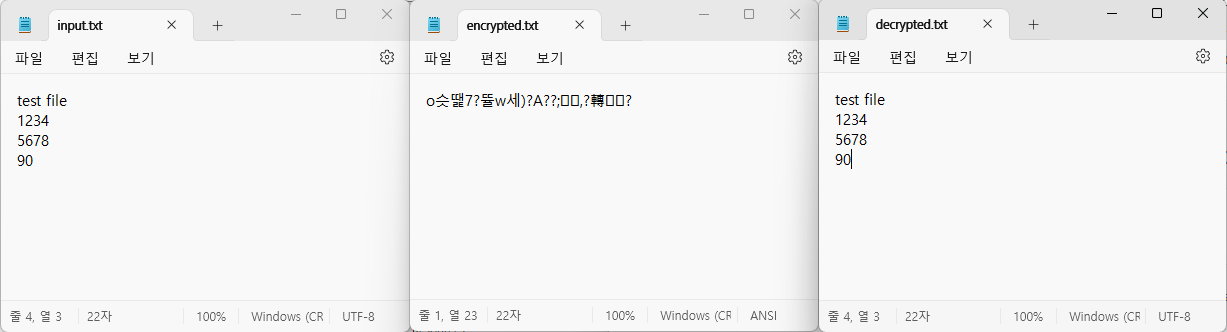
아래는 결과
'Qt (GUI)' 카테고리의 다른 글
라즈베리파이 부팅시 Qt 자동실행 (0) 2024.05.10 Qt plugin (동적 플러그인) 만들기 Windows 환경 (0) 2024.04.12 Qt QML 실행파일 배포하기 (0) 2024.04.08 Qt 한글 입출력 깨짐 encording (0) 2021.01.03